dadijo✳العربية ↗

CUSTOM APPS · FORMS · AUTOMATION

Custom apps. Digital forms. Less manual work.

Help your team collect reliable information, keep spreadsheets updated, and finish repetitive tasks with less manual effort. We build the forms, connections, automation tools, and apps around the way you work.

✳Practical tools. Thoughtfully built.
KOBO TOOLBOXGOOGLE SHEETSAPPS SCRIPTANDROIDWINDOWS

01 / Services

Less repetitive work. More useful information.

From collecting field information to automating office work, here is what you can ask us to create.

01↗

Collect the right data in the field

We design forms around the information your team needs. Staff use KoboCollect, an Android data collection app, to record answers, photos, and locations—with checks that help prevent incomplete entries.

For surveys, shop visits, inspections, and field teams
02↗

Keep your spreadsheets updated automatically

We connect your Kobo server to Google Sheets. Scheduled scripts fetch new submissions, apply your validation rules, flag issues, and calculate results—reducing repeated downloads and copying.

For monitoring incoming data and preparing recurring reports
03↗

Automate repetitive computer tasks

We build tools that handle routine jobs such as moving and organizing photos, processing files, checking Excel data, and making backups. A task you repeat manually can become an automatic workflow.

For teams spending time on the same steps every day
04↗

Turn a specific need into an app

We create Android and Windows apps around an agreed purpose, from a focused everyday utility to a tool for your work. You review and test working versions as we develop them.

For people and businesses needing a purpose-built tool

EXAMPLE · A FIELD VISIT WORKFLOW

From a team visit to a checked report.

  1. A form designed for your visit
  2. Staff collect answers and photos on Android
  3. Scheduled updates bring submissions into Sheets
  4. Rules flag issues and prepare results

Your team collects the information once. The connected workflow reduces the effort of transferring, checking, and reporting it.

02 / Selected work

Ideas turned into useful tools.

01 / ANDROIDTasbeeh Pro app screenshot from Google PlayDaily life, made simpler.

Tasbeeh Pro↗

An Android dhikr counter with offline progress, personal adhkar, and shared group counting. Published on Google Play.

View project ↗
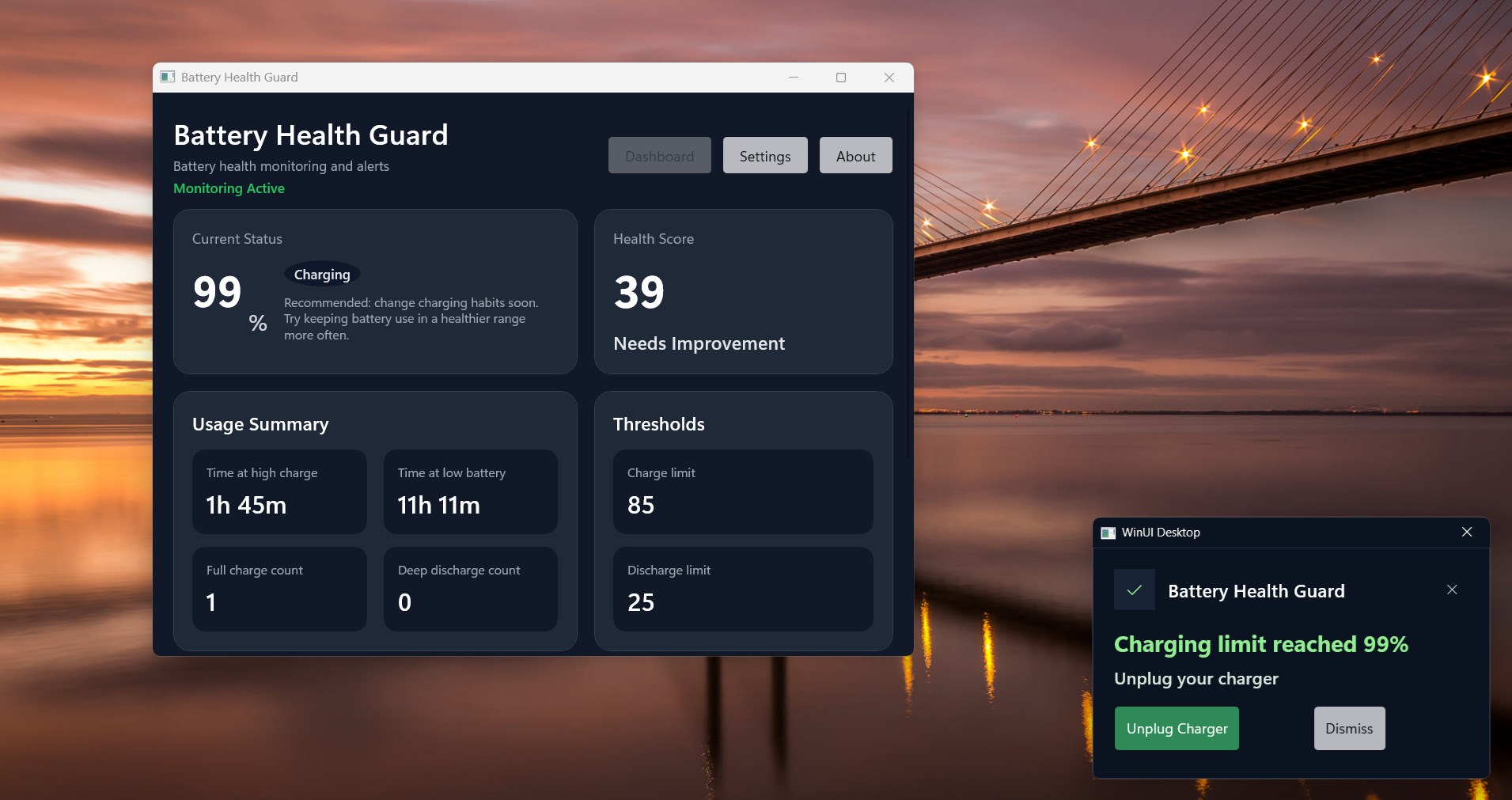
02 / WINDOWSBattery Health Guard app screenshot from Microsoft StoreSmall habits. Useful reminders.

Battery Health Guard↗

A Windows app supporting better charging habits. Published on Microsoft Store.

View project ↗
03 / WORKFLOW
▤→▦→▥
From collection to clarity.

Forms → Sheets → insights↗

Field submissions flow from Kobo into Google Sheets through scheduled scripts, with validation, calculations, and reports tailored to the work.

AUTOMATION IN PRACTICE

Real tasks. Tools we built.

Examples from our completed work, showing how a repetitive task can become a simpler workflow.

01

Automatic photo filing

The taskField photos arrive in Google Drive, but staff still need to download them, put them in the right folders, and update a tracking sheet.

What we builtWe built a scheduled tool that checks eligible photo folders, copies JPG files into organized office folders, archives the originals in Drive, and updates Google Sheets with processing status.

Why it helps

Less manual downloading and filing, with a clearer record of what has been processed.

02

New file arrival alerts

The taskStaff repeatedly open shared Drive folders to find out whether new files have arrived.

What we builtWe built a desktop tool that checks selected folders at an adjustable interval, shows file counts, and displays a popup listing newly detected files.

Why it helps

Staff can respond to new arrivals without repeatedly checking each folder themselves.

03

Supervisor reports without retyping

The taskBack-check results must be transferred into a separate Excel report, including category codes, dates, and checks.

What we builtWe built a tool that reads the back-check workbook, fills the supervisor template, converts agreed categories to codes, counts completed checks, and recalculates Excel formulas. Items needing an explanation remain for manual review.

Why it helps

Less copying between spreadsheets and more consistent report preparation, while keeping human review where needed.

04

Find missing submissions and follow-up work

The taskA server export and field-visit records may disagree. Supervisors need to know which records are missing and which visits are overdue.

What we builtWe built a tool that matches a selected server CSV export to Google Sheets by shop code, compares receipt status with field-visit dates, and applies color-coded statuses for completed, missing, or overdue records.

Why it helps

A clearer follow-up list, so supervisors can focus on the records that need attention.

Have a similar task? Let’s discuss it ↗

03 / How it works

Your idea. A clear way forward.

01

Talk it through

Explain what you need in your own words. We work through the details together.

02

Build step by step

Review working versions, try them yourself, and tell us what needs to change.

03

Test, refine, deliver

Improve the result through feedback until it fits the agreed requirements.

LET’S MAKE SOMETHING USEFUL

Have a task you wish was easier?

Need an app, a survey form, or an automated report? Tell us how you do the task today and what you want to improve. No technical knowledge needed.

Fayez Hadraj, founder of DadijoTell me how you work today. We’ll discuss the details, review working versions together, and refine the solution through testing.

Tell us about your idea

We’ll use your details only to respond to your enquiry.